What’s happened to the website. Why can’t IT people leave something that is working really well alone. I can’t even find how to input my bait station inspections I did yesterday. To be honest, I am a really busy person and don’t have time or inclination to relearn a completely new website redesign.
3 Likes
@gullyrestoration are you looking for the single-station input or the multi-station input?
For single stations, try Quick Actions > I Serviced An Installation > A Bait Station.
For multiple stations, here’s an excerpt from the help page Adding installation records | Trap.NZ Help & User guides
Adding bait station records
You can use the Add bait station data page to quickly add records to multiple bait stations.
- Apply a filter to select the bait stations you want to enter records for. Mostly you will be filtering by line, but you can also select individual bait stations by entering the first characters of the bait station number or code. By default the filter is set to show active bait stations only - use the dropdown to select retired bait stations.
- Set the date and time to be logged with each record you add. You will need to press the Apply date button whenever you change the date.
- For each bait station, put in the appropriate details and press the Save button.
The first time you add a record you will need to fill in all details. Put in 0 for Bait remaining and Bait removed. For subsequent records these details will be inserted automatically based on the previous record.
For the Active ingredient, Target species, and Formulation fields, a list of predefined values will be displayed once you start typing. Please select values from the list if possible.
Each row in the table shows the last record added (if there are any). You can click the edit button alongside the record to edit the full bait station record. You can edit or delete a record you’ve just added this way, or you can add notes to the record. The bait station row will turn green when a record has been recently added so that you keep track of where you are up to.
Personally, I really like the app interface for bait stations and will usually use that even if I’m already sitting at the computer, unless I have so much data that it’s worth doing a whole spreadsheet to import.
1 Like
totally agree. It was really easy on the mobile app. Now I have to click back and forth to enter a catch, instead of just clicking the trap on the map, enter, save, next trap. Even the web version is bad now. There’s a German word for it: verschlimmbessert (improved for the worse).
2 Likes
Hi,
on my trapline there are now two icons for each trap:
the standard one with a T in a triangle, and another triangle with a M and green fiiling.
???
Thanks.
Doris
@dpeleikis it may be that a monitoring site has been added to the trap site. I do know a project that has added this for auditing of the traps
1 Like
I’m not too sure where you are entering the catches from on the app that has changed as the process has not changed there. It would be good to know what steps you are taking
Yeah I agree. The app looks the same to me but the website has completely changed. No advice that it was going to, or why.
I went to the main screen the other day and had no idea what to do next.
I think trap.nz don’t want to show the map whenever anyone logs in, or opens the website
Like all of these things, we’ll get used to it over time.
1 Like
I really like the new design.
Kia ora the website navigation page has changed from being installation driven to action driven. Everything beyond the navigation page is still as before on the webpage. The change has been made for to allow for future predator control developments that didn’t fit into the previous navigation page. If you have any questions don’t hesitate contact trap.nz on 0800trapnz or support@trap.nz
Yeah re-reading my post, I was probably too negative.
I’m sure it will be better in the long run.
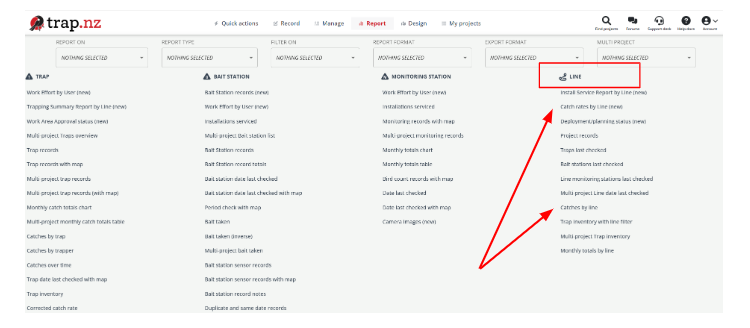
Yes I’m not keen on the new look web design either. Finding the reports that I use after each farm I service is way more difficult & I can’t find one in particular. From memory it was catches per line(?) It gave a list of what animals were caught. I can do a similar report but it just gives a total catch over time. Any help would be appreciated please
@gbest if you click “Report” at the top of the screen, then scroll down, there’s a line right at the bottom in red that says “See all reports”. If you click there, you’ll get the full listing of reports in the same format as they used to be. I can see Catches by Line on that list, so hopefully you can too.
If it’s one you use a lot, it might be worth bookmarking that specific page in your browser?
@gbest Line reports now have their own section. I’ve added the two options for catches by line as I wasn’t sure which you were using
Top job thank you, very much appreciated
I do agree the old layout was not user friendly at all, but now I can’t seem to intuitively find anything all over again. Certainly doesn’t help getting our trappers using the app which I’m sure people already recognize as a major struggle.
1 Like